

User error while drinking from a cup
User error happens when a tool's user makes a mistake. This is a normal part of life.[1] While it's an especially common concern in software engineering, it can happen with any tool. Engineers need to plan for user errors to minimize their impact, especially when safety and security are concerned.
Other terms for user error include PEBKAC (Problem Exists Between Keyboard And Chair).[2] This acronym, while entertaining, can downplay the responsibility of engineers to make well-designed products that plan ahead for user error.
Causes
User error may happen because of:[1][2][3]
- Confusion
- Distractions and interruptions (either part of the tool or part of the user's environment)
- Excessive cognitive load
- Fatigue
- Lack of feedback
- Poor training/onboarding
- Time constraints
Engineers can't prevent some issues, like clumsiness or a distracting child in the user's house. But other causes, like a poor user experience leading to confusion, can be fixed. Good design can remove some causes of user error and make it easy for users to recover from mistakes.
Types of user error
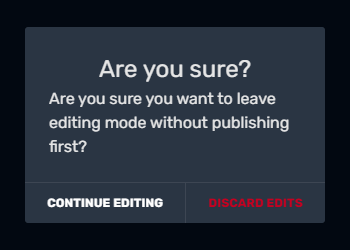

An "Are you sure" message triggered when a user is about to discard unsaved changes
User errors can be classified in a few different ways:[2][3]
- Lapses: The user forgets to do something.
- Mistakes: The user tries to achieve a goal with the wrong process.
- Slips: The user does something they didn't intend to do.
- Violations: The user doesn't comply with rules or best practices.
Engineers should plan for all types of mistakes along the user's journey.
Examples
Here are some examples of preventable errors:
- A man searches for the "Download" button on a website. The website is full of bright colors, flashing animations, and ads. He clicks an ad that prompts him to download a computer virus. If the website had fewer distractions, this wouldn't have happened.
- A woman with ADHD and dyslexia tries to read through a long text block of instructions in the manual, but she struggles to understand. She presses the wrong buttons on the machine. The machine malfunctions and she gets blamed. While her ADHD and dyslexia can't be helped, the manual could've been clearer and easier to read.
- A newly hired HTML developer is told to use proprietary software, and they ask to be trained, but their boss says everyone is too busy. Documentation is minimal. The developer begins using the software incorrectly.
- A user tries to tap the "close" button on a mobile ad, but it's too small, so the user accidentally visits the ad provider's website.
Here are some examples of errors that can't be prevented, but can still be managed:
- The user makes a typo and enters the wrong password.
- An elderly user struggles with the basics of using a computer, so she keeps getting confused and clicking the wrong things.
- A man tries to fill out a form online. His husband asks if he's done the laundry yet and their toddler begins to scream. The man hits the "submit" button even though he accidentally left a few fields blank. Short of the software engineer personally visiting his home to calm the toddler and do the laundry, nothing can be done to prevent this.
Impact
In low-stakes situations, user error generally isn't a big deal, especially if the design allows for easy recovery. Graceful handling of user errors can make tool usage a more positive experience.
Poor error handling worsens user experience. Users may experience frustration, loss of trust, and worse productivity when errors aren't handled well. They may give up and go somewhere else.[1]
Sometimes, user error is more dangerous. Many cybersecurity breaches are caused by user error.[4]
Considerations
The tool should help users recover from errors. This can include clear error messages that non-judgmentally tell users how to fix their mistakes.[2]
Designing to reduce error
| “ | This looks less like “make sure you have a complicated password” and more so “let’s make it that if somebody got your password, nothing bad would come of it”. |
| —HUMAN blog[4] | |
Engineers can build in safeguards to help with user errors. These include:[1][2][3]
- Clear, intuitive, and uncluttered user interface
- Clear organization
- Consistent, conventional design
- Controls that are easy to use (e.g. buttons not too close together)
- Error prevention tools (confirmation messages, helpful error messages, validation checks)
- Good onboarding and documentation/manuals
- Incident investigation
- Instructions and tooltips
- Presenting information as the users need it (instead of cramming it all into one place)
- Regular system maintenance
- System testing
- Usability testing & user feedback
Error logging and usage data can help engineers notice common user errors.[2][3] Then, they can improve the tool to help prevent or manage these errors.
See also
- Accessibility
- Error messages
- Fat finger problem
- Software engineering topics
- Usability
- User interface
References
- ↑ 1.0 1.1 1.2 1.3 Understanding User Error: Analyzing Common Mistakes in User Interactions, Claritee
- ↑ 2.0 2.1 2.2 2.3 2.4 2.5 User error, Bot Penguin
- ↑ 3.0 3.1 3.2 3.3 User Error — All About Preventing, Detecting, and Managing Errors, UXPin
- ↑ 4.0 4.1 User Error and Cybersecurity, Human